
The Future of Logging In (minus the Password Pain)
As long we have been using secure websites and applications, passwords are how we prove who we are. If you have the password, you can be anybody and if anyone else has your password, nothing is stopping them from impersonating you. The more websites and applications we use, the more passwords we use, and as the sites get hacked, the restrictions on making password complex keep growing, which has made passwords a source of frustration, confusion, and security problems.
As we use more and more website and applications our list of passwords continues to grow. Frequent security breaches have led to increasingly complex requirements, turning passwords into a source of frustration, confusion, and security risks.
Passwords are now a bane of our existence, we forget them, we reuse them, we write them down and hackers steal them.
Passkeys are an attempt to finally fix this mess — not by making passwords “better,” but by removing them entirely.
This article will help us understand Passkeys, what are they and get you started on using them.
What Is a Passkey?
A passkey is a new way to prove you are you to a system without providing a password but using your device to indicate your identity.
So the application instead of checking for (“something you know”) a password, requests you to use your device ("something you have") such as your smartphone to approve log in by unlocking your device using ("something you are”) fingerprint, face or (“something you unlock”) PIN.
To grasp the concept of passkeys, you can think of a passkey like a digital key stored safely inside your phone or computer.
A Familiar Analogy: Keys vs Passwords
So how do passkeys stack up against passwords? Let’s look at how we actually use them.
Passwords Are Like Shared Secrets
If I give you the code to my front door:
* You can get in.
* Anyone you share it with can get in.
* If that code leaks online, total strangers can get in.
Passkeys Are Like Physical Keys * The lock recognizes the unique shape of your key. * Your key never actually leaves your pocket. * It cannot be copied, guessed, or shared. That’s the core idea.
How Passkeys Work
Let us now look at technically how the passkeys work and what exactly happens when you login.
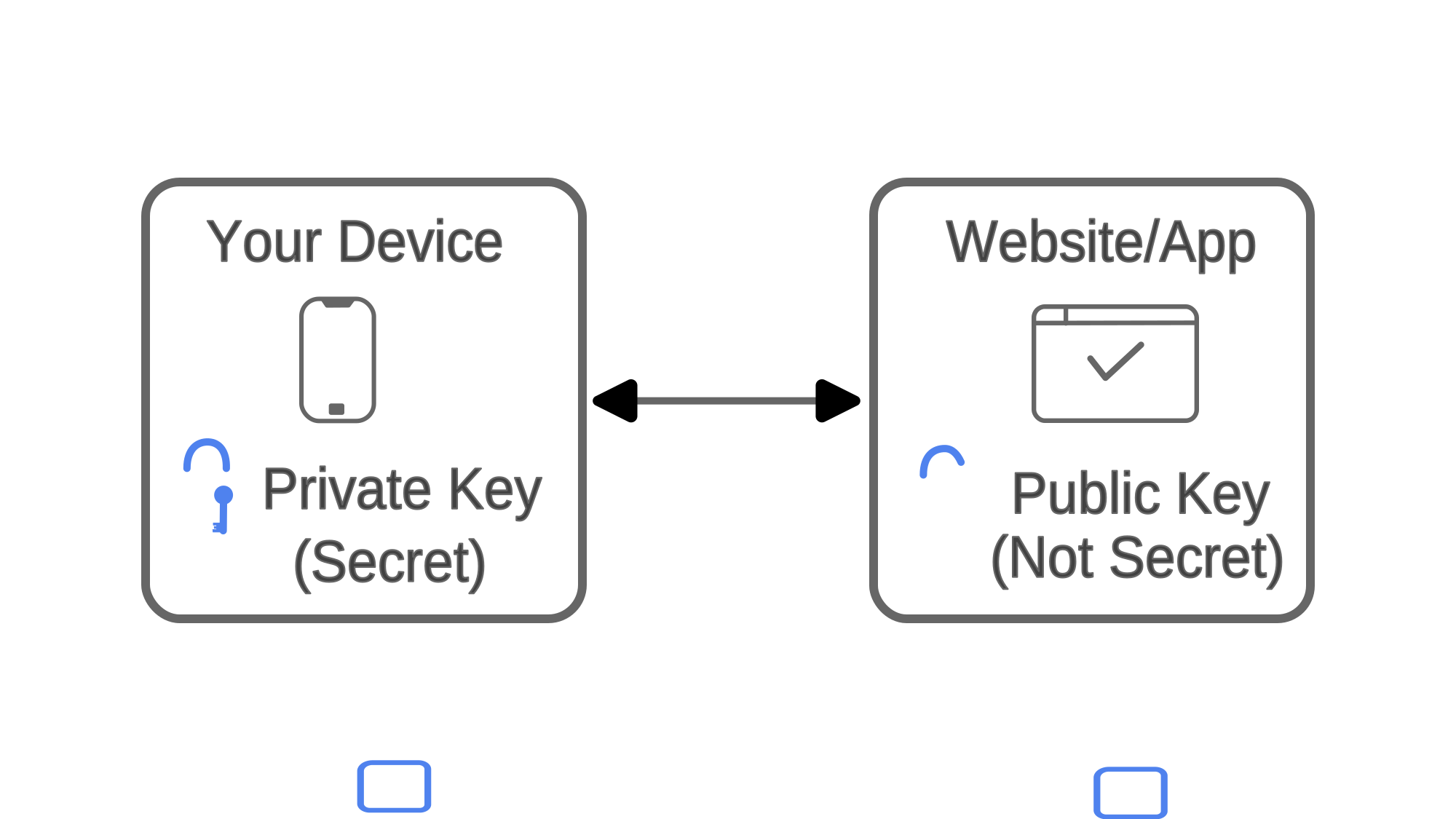
When you create a passkey, two keys are created a private key and another public key. The private key stays on your device and the public key stays on the website.The public and private keys only work together.
The private key never leaves your device — ever.
When logging In With a Passkey
The website prompts you to confirm if it is indeed you (where originally you would enter the password). To do that, it asks you to approve login using your device.
You then unlock your device using your face, fingerprint or PIN. Upon unlock, the device sends proof to the website that it is indeed you. Note that it does not send the key and the key never leaves your device.
Upon receipt of this proof, the website then grants you access to secure pages and data. Thus, allowing you to login without typing in passwords and no secrets sent over the internet.
Visually:
Website → Challenge → Your Device
Your Device → Proof → Website
Why Passkeys Are More Secure
1. They Can’t Be Phished
If you land on a fake website:
fake-bank.com ❌real-bank.com ✅
Your passkey simply won’t work on the wrong site.
Why?
- Passkeys are locked to the exact website
- A look-alike site gets nothing
Even if you’re tricked, the technology protects you.
2. Nothing Valuable Is Stored on Servers
When websites get hacked today, attackers steal:
- Passwords
- Password hashes
- Reset tokens
With passkeys:
- The server only has public keys
- Public keys are safe to share
- They cannot be turned back into private keys
A breach becomes far less damaging.
3. No Guessing, Reuse, or Weak Passwords
Passkeys:
- Are unique per site
- Are automatically generated
- Can’t be reused elsewhere
- Can’t be “weak”
The user doesn’t create anything — and that’s a feature.
Why Passkeys Are Easier for Normal People
This is the underrated part.
What You No Longer Need to Do
- Remember passwords
- Invent complex phrases
- Change passwords regularly
- Use “Forgot Password”
- Wait for email reset links
What You Do Instead
- Look at your phone
- Touch your fingerprint reader
- Click “Continue”
Security disappears into the background.
The Real Downsides (Being Honest)
1. Your Devices Matter More
Because passkeys live on devices:
- Losing all devices can be a problem
- Recovery planning is important
Thankfully, most platforms support:
- Secure cloud syncing
- Backup authentication methods
- Device recovery options
Still, it’s something to be aware of.
2. Ecosystems Are Still a Thing
Passkeys work best within:
- Apple ↔ Apple
- Google ↔ Android/Chrome
- Microsoft ↔ Windows
Cross-platform support exists, but it’s not perfect yet.
This is improving fast.
3. Not Every Website Supports Them (Yet)
We’re in a transition phase:
- Some sites → passkeys
- Some sites → passwords
- Some → both
This is normal for new technology.
Best Places to Use Passkeys Today
- Email accounts
- Banking and finance apps
- Social media
- Cloud services
- Developer tools
Best for:
- People who forget passwords
- People who reuse passwords
- Families and older users
- High-value accounts
If an account matters, passkeys help.
Try Passkeys Yourself (Simple Test)
Option 1: Demo Site
Search for:
“passkey demo” or “WebAuthn demo”
You’ll:
- Create an account
- Create a passkey
- Log out
- Log back in without a password
Option 2: Real Services
Many popular services already support passkeys:
- Apple ID
- GitHub
- Microsoft
Enable passkeys in security settings and try signing in again.
Advanced Uses of Passkeys (Where This Gets Interesting)
1. Passwordless Workplaces
Companies can:
- Remove passwords completely
- Eliminate phishing attacks
- Reduce IT support tickets
- Secure admin access
Employees just unlock their devices.
2. Strong Security Without Annoying MFA
Instead of:
- Password + SMS code + app approval
You get:
- One biometric action
- Stronger protection
- Less friction
Passkeys are multi-factor, built in.
3. Hardware-Backed Security
Passkeys can live inside:
- Secure phone chips
- Laptop security modules
- Physical security keys
This protects against:
- Malware
- Remote attackers
- Credential theft
4. Beyond Human Logins (Emerging)
Passkeys can also be used by:
- Servers
- Applications
- Automated systems
They can replace:
- API keys
- Shared secrets
- Long-lived tokens
This opens the door to safer system-to-system trust.
Final Thoughts
Passkeys don’t just improve security — they remove an entire category of problems.
They:
- Protect users from phishing
- Reduce data breach impact
- Make logins faster
- Lower mental load
- Scale from everyday users to enterprises
Passwords won’t vanish overnight, but passkeys are clearly the future.
Once you start using them, typing passwords feels like dialing a rotary phone in a smartphone world.